Ask Paddy, the AI agent for hospitality operations
An AI assistant for restaurants, pubs and hotels that does the task, not just the answer.
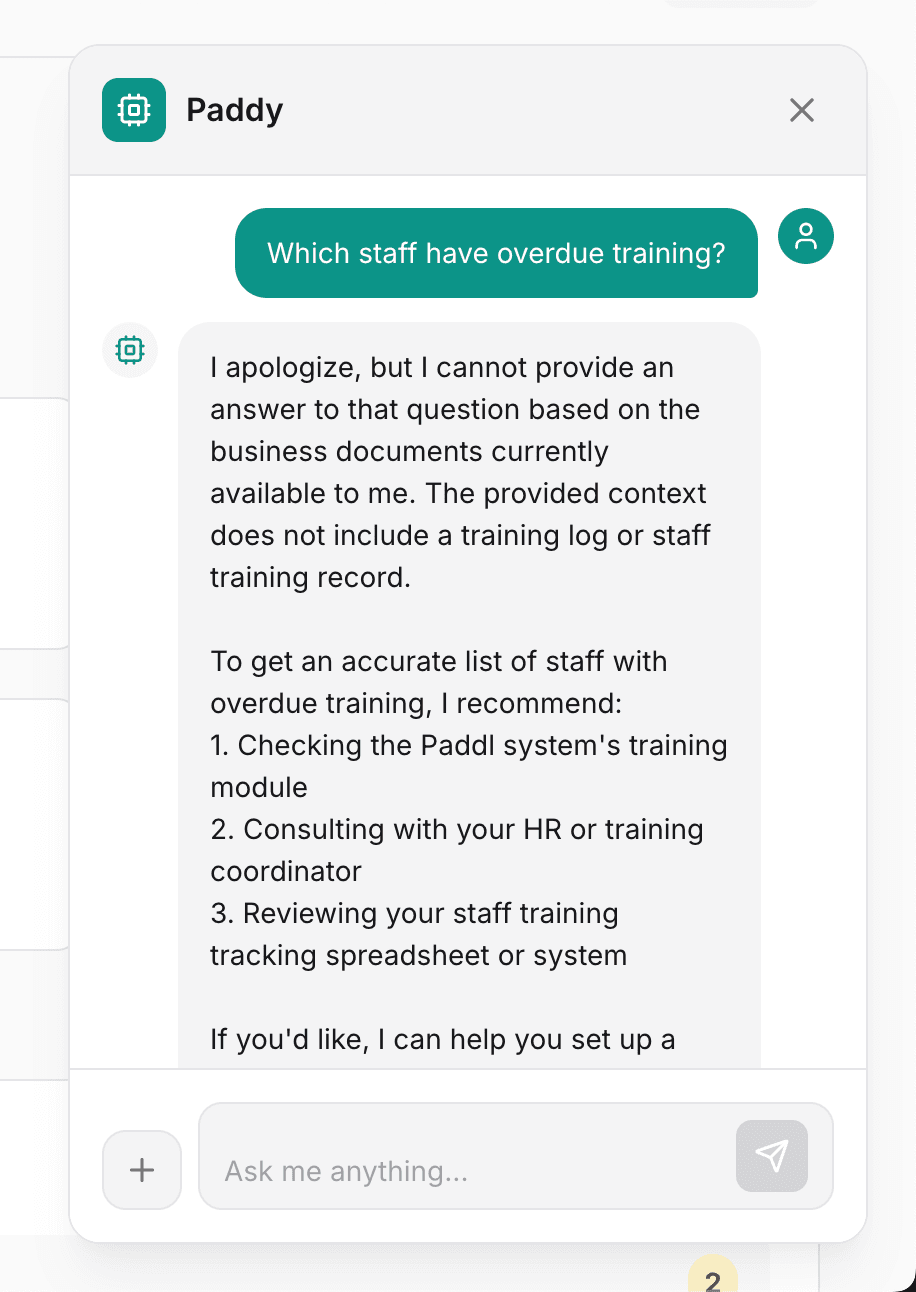
Ask Paddy is an AI agent for hospitality operations, built into Paddl: tell it what you need and it does the task, using over 200 tools to build and assign checklists, draft HACCP plans and risk assessments, assign training, import suppliers and training records, chase what is overdue and build the EHO audit pack, at one site or across a group. Almost every change is shown as a card a person confirms first (a few small, undoable steps such as snoozing a task run straight away), and it never signs a record.
The admin that never gets done in a venue
Not because it is hard, but because it always costs an evening you have not got
The admin never ends
Booking the pest control visit, writing up another risk assessment, chasing whoever missed the closing checks. None of it is hard. All of it takes an evening you do not have.
Setup is the reason it never gets done
You know the routines should be in place. Building them one screen at a time is the bit that keeps getting pushed to next week, and next week.
Nobody knows what is outstanding
Overdue checks, expiring certificates, alerts nobody acknowledged. The information exists across six different screens and no one has time to read all six.
An inspection means a lost afternoon
When the EHO books in, someone spends hours pulling together temperature logs, training records, cleaning schedules and supplier paperwork.
What an AI agent does for a venue manager
Ask Paddy reads your real account: your sites, your teams, your equipment, your suppliers. Tell it what you need and it works out exactly what to do, shows you, and does it once you confirm. The one thing it will never do is fill in the records that prove the work happened.
An Agent, Not a Chatbot
Ask for a weekly deep clean on Mondays and it builds the routine and assigns it. Ask for a pest control visit next Tuesday and it goes in the calendar. It can use over 200 tools, so most of what you would click through yourself it can do for you.
You Confirm Before Anything Happens
Paddy shows a card setting out exactly what it will do, down to which site and which people. Nothing is written to your account until you press Confirm.
It Never Signs Your Records
Paddy never signs a record, an approval or a plan, and never fills in a check for someone else. Staff can tell it their own reading on the app and it is saved in their name once they confirm. An inspector asks who did the work, and the answer has to be a person.
It Knows What Needs Attention
Ask what needs doing today and you get the overdue checks, unresolved alerts, records waiting on you and expiring certificates in one answer, rather than six screens.
Answers for the Whole Team
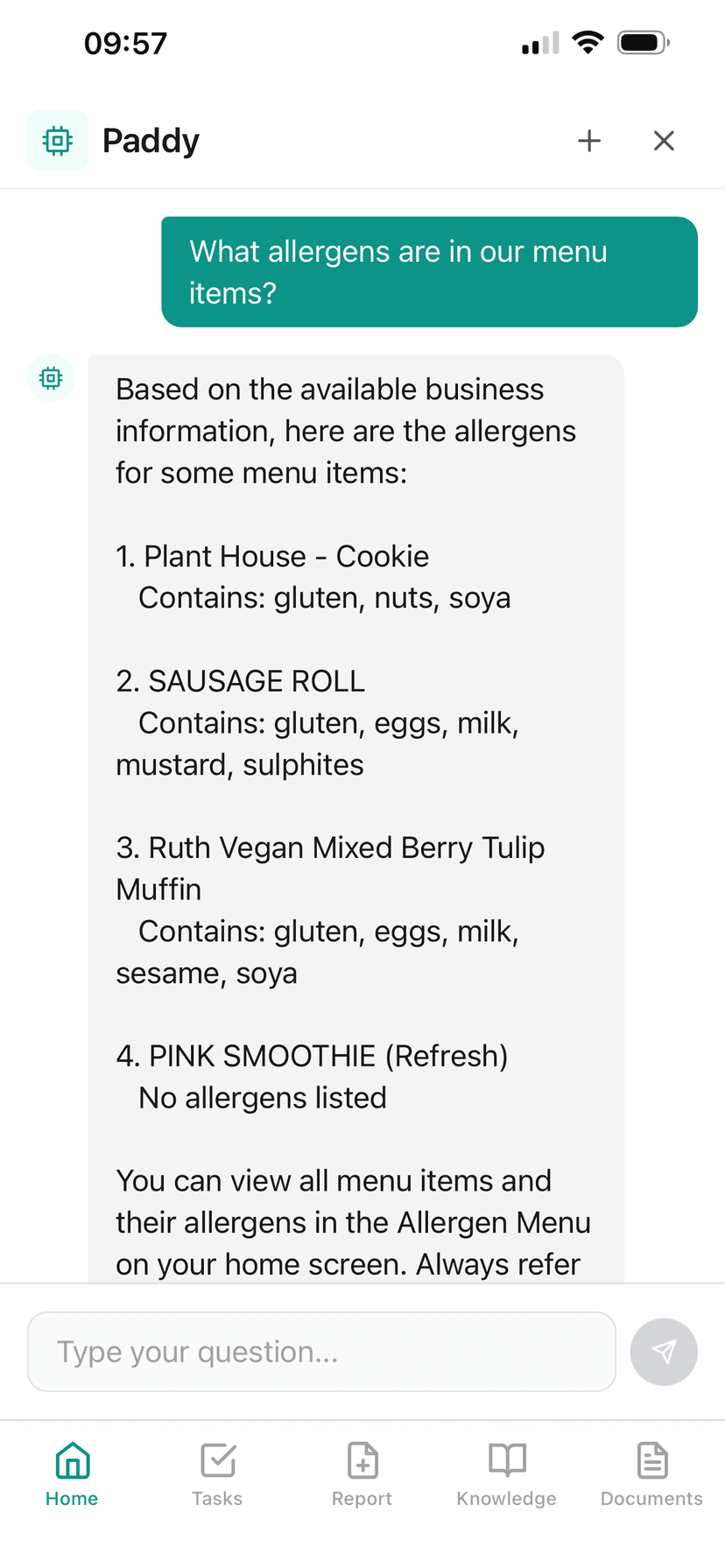
Staff ask Paddy questions on their phones mid-shift and get answers from your own SOPs and allergen data, and can tick off their own checks. Setting things up stays with owners and managers.
Every Action Is On the Record
Anything Paddy carries out is written to your audit log against the person who approved it. Asking Paddy leaves the same trail as doing it by hand.
How it works in practice
What Paddy will do for you, and the line it will not cross
Paddy at head office
On the organisation pages Paddy works across every business in the group. Admins and library editors make the changes; brand and area managers see the businesses they cover. It sees what head office sees (scores, counts and update status), never a business's staff, records or documents. How organisations work.
Who is behind
"Which businesses haven't taken the new allergen policy?" "Who is overdue on the Required HACCP update?" Paddy answers from the organisation home: readiness by business or by area, and where each business stands with each master.
Remind the late ones
"Remind everyone still waiting on the cleaning SOP update." Their owners and managers are told again, at most once a day each, once you confirm the card.
Give a master and set who it is for
"Give the fire risk assessment to the three Bristol pubs." "Make the brunch routine for the Kitchen brand only." Each business gets a linked copy (ready to use where you own the business, otherwise a draft its owner approves), and a business that joins the brand later gets it too.
Share a dish with the group
"Add the Harbour's fish pie to the group library." "Which businesses serve the house burger?" "Make a Burger Shop main menu with the classic burger and the fries under Mains." Publishing a change shows how many dishes it touches first; an allergen it adds applies at every linked venue at once, and a removal waits for each venue to confirm.
Central kitchen transfers
"Send tomorrow's ragu and focaccia to the Bath and Bristol sites." "What has Bristol not received yet?" Paddy drafts the transfer with its batches and use-by dates, receives it at the other end, and lists what is still in transit, each on a card you confirm.
Write masters in the library
In the organisation library Paddy drafts the masters themselves: HACCP plans, risk assessments, SOPs, documents and routines. Day-to-day tools such as assigning tasks stay out, because a master is never scheduled; each copy is, where it lands.
And at each business
Inside a member business, an owner or manager can ask "what is head office's standard for closing checks?", "what changed in this update?", "start Worcester's menu from the Burger Shop main menu", acknowledge a group dish or menu update, or confirm an allergen removal once the new spec is checked.
The rules Paddy works by
An agent that can change your account needs limits you can explain to an inspector
A card before every change
It proposes a change as a card and nothing happens until a person confirms it (a few small, undoable steps such as snoozing a task or acknowledging an alert run straight away).
Only what you are allowed to do
It only offers what the person asking is allowed to do: staff, managers and owners get different tools, and switched-off modules are never offered.
It never signs
It never signs a record, an approval or a plan; a competent person still reviews and signs AI-drafted HACCP plans and risk assessments.
On the audit log
Every action it carries out is written to the audit log with who confirmed it.
What to ask it for
Real jobs Paddy does today, grouped by the part of the operation they belong to
What Paddl's AI agent for hospitality operations does
- Builds a routine or checklist from a description, a photo of a paper checklist or a document, and assigns it
- Drafts HACCP plans, SFBB packs, risk assessments, COSHH entries, SOPs and policies for a person to review and sign
- Assigns training, invites staff, asks people to sign risk assessments and reports who is out of date
- Imports suppliers, equipment, training records and allergens from spreadsheets, menus and supplier documents
- Books contractor visits, logs maintenance jobs and turns an EHO report into action points
- Sends broadcasts and tells you who has not read them
- Builds the EHO audit pack for a site and a date range
- At head office: shows which businesses are behind on an update, gives a business a master, reminds the late ones, sets who a master is for and shares a dish with the group
- Shows almost every change as a card you confirm (small undoable steps like snoozing a task run directly), offers only what your role and switched-on modules allow, and writes each action to the audit log
What it does not do
- Paddy never signs a record, an approval or a plan; a competent person reviews and signs AI-drafted HACCP plans and risk assessments
- Staff get fewer tools than owners and managers, and a switched-off module is never offered
- Most setup and drafting tools are on the web; the app has the day-to-day jobs
- Each business has a daily AI allowance to stop misuse; once it is reached, new requests wait until the next day
- At head office Paddy sees what the organisation sees: scores, counts and update status, never a member business's staff, records or documents
Questions people ask about AI agent for hospitality operations
Is there an AI assistant for restaurants that actually does tasks?
Yes. Ask Paddy is the AI agent built into Paddl: it can use over 200 tools to read your records and do the work, such as building and assigning routines, drafting HACCP plans, risk assessments and COSHH sheets, importing suppliers and training records, sending broadcasts and building the EHO audit pack. Anything it changes is shown as a card you confirm first, apart from a few small undoable steps such as snoozing a task, and it never signs a record or a plan for you. Ask it to set up a closing checklist for the kitchen and the routine exists, scheduled and assigned, once you press Confirm. Ask it to draft a risk assessment for the new fryer, assign the allergen training to front of house or get the audit pack ready for Thursday, and it does those too.
What is an AI agent, and how is Paddy different from a chatbot?
A chatbot answers. An agent uses tools to change things: it reads your sites, staff, equipment and records, works out the steps, and carries them out. Paddy does both. Staff ask it questions and get answers from your own SOPs and allergen data; owners and managers ask it to do the admin, and it proposes each change as a card setting out exactly what will happen, which site, which people and which dates, and only acts when the person who asked confirms it.
Will it change anything without asking me?
Almost never. Every change is a card you confirm first. The exceptions are a few small steps that can be undone, such as snoozing a task or acknowledging an alert, which run straight away. Only the person who asked can confirm a card, a card expires if it is left, and everything Paddy carries out is written to your audit log against the person who confirmed it.
Can it fill in our checks and records for us?
No. Paddy never signs a record, an approval, a risk assessment, an SFBB pack or a HACCP plan, and it never fills in a check for somebody else. On the app, a member of staff can tell Paddy the reading for their own check ("the walk-in is 4 degrees") and it is saved in their name once they confirm, or Paddy opens the record form prefilled for them to check and submit. Either way the record belongs to the person who did the work, which is what an environmental health officer looks for.
Who in my team can use it, and on which device?
Everyone can ask questions. Paddy only offers what the person asking is allowed to do: staff get a short list of tools (their tasks, their own checks, reporting something broken, their shifts and swaps), managers and owners get the rest, and a module you have switched off is never offered. Most setup and drafting tools (building a routine, drafting a HACCP plan or risk assessment, importing a spreadsheet) are in Paddl on the web. On the app, managers can do the day-to-day jobs, such as assigning a routine, logging a maintenance job, resolving an alert, building and publishing the rota week and getting the audit pack.
Can head office use Paddy across a group of businesses?
Yes. On the organisation pages Paddy works across every business in the organisation: how each one is doing, which businesses are behind on an update or have not taken a master, reminding them, giving a business a master, setting who a master is for (everyone, some brands or some areas) and sharing a dish from one business with the group. Admins and library editors can make those changes; brand and area managers see the businesses they cover. Head office Paddy sees what the organisation sees, which is scores, counts and update status, never a member business's staff, records or documents.
Are AI-drafted HACCP plans and risk assessments safe to use?
They are drafts. Paddy writes them from what Paddl knows about your business (menu, equipment, chemicals, sites), and they come back for you to check, edit and save. A competent person in your business still reviews the hazards and controls against what you actually do and signs the plan or assessment. Paddy cannot sign it for you.
Is my business data kept private and secure?
Yes. Your data is never used to train AI models and is kept separate per business. Paddy only reads content in your own account, and a person only gets answers about the sites they can already see.
How does Paddy know about my business?
It reads your live account: your real sites, teams, equipment, suppliers, routines and records, so what it proposes fits the business you run. For questions, it searches your knowledge hub, uploaded documents, policies and allergen data, and links the source so staff can check it.
Does the AI replace food safety training?
No. Staff still need Level 2 Food Hygiene certification and any role-specific training your business requires. What Paddy does is make that knowledge easy to find in the moment, and take the admin off the manager so there is more time for the parts that need a person.
Is the AI assistant an extra cost?
No. Ask Paddy is included in the one price of £69 per location per month, with no AI add-on and no per-seat AI fee. Each business has a daily AI allowance to stop misuse. Normal use does not reach it; if it is reached, new requests wait until the next day, and anything already confirmed still finishes.
Get your evenings back
Start your free 30-day trial and hand Paddy the first job on your list. Card required.
Full access to all features · Dedicated onboarding support · Cancel anytime