Document management software for UK hospitality
Upload anything, we do the rest.
Paddl's document management software takes any file a venue holds (certificates, Safety Data Sheets, menus, policies, licences, leases, insurance schedules), classifies it with AI, extracts the dates and data into the right record, tracks expiry, and collects staff sign-off.
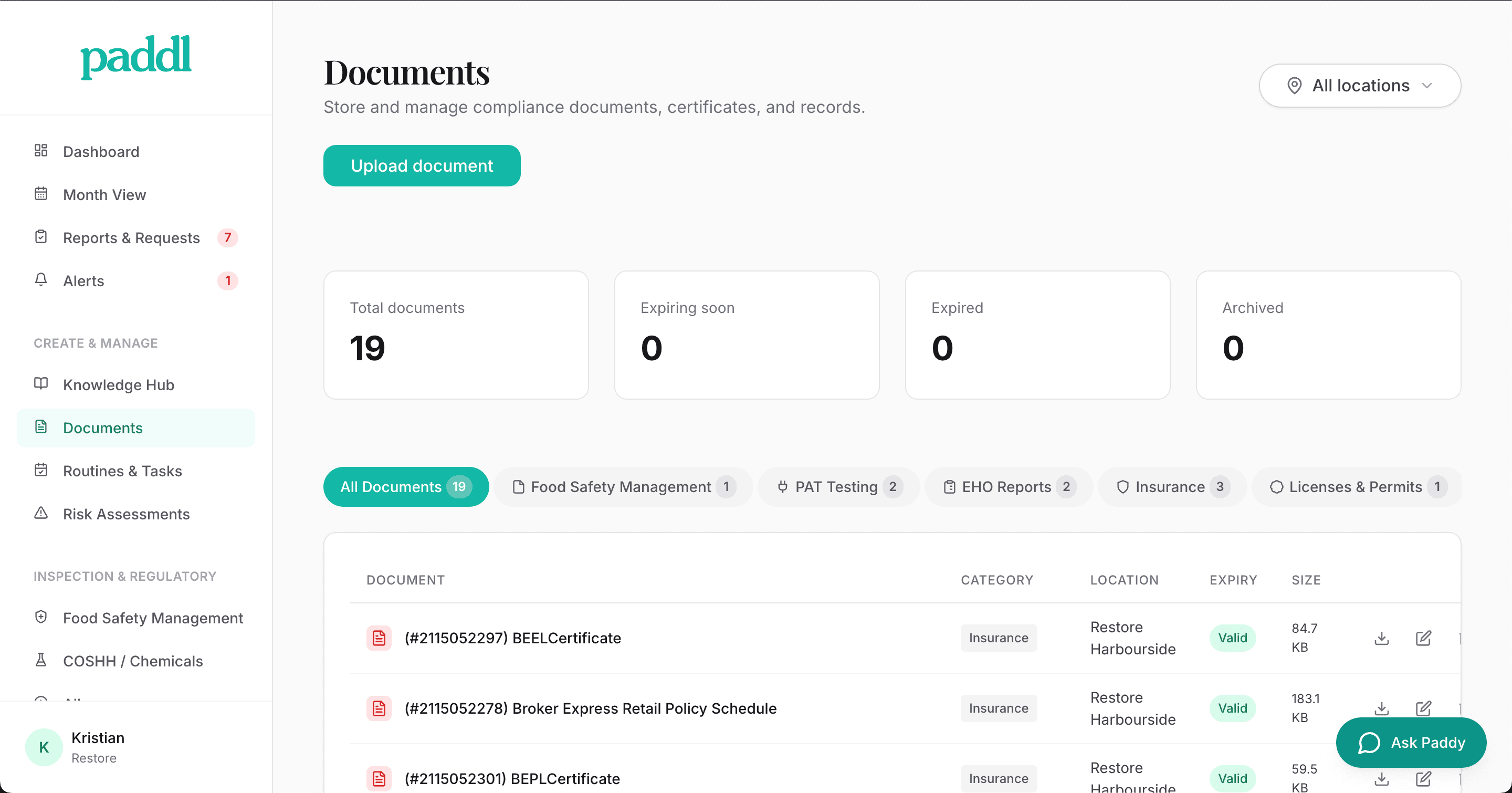
The documents a venue has to keep, and where they end up
Most hospitality operators know these problems all too well
Documents scattered everywhere
Certificates in a filing cabinet, policies in email, training records in a spreadsheet. Without digital document storage, you're scrambling to find anything when an inspector asks.
No expiry visibility
Gas safety certificates, insurance policies, and food hygiene ratings all expire. Without certificate expiry tracking, you find out when it's too late or when the inspector points it out.
No proof staff have read policies
You updated the allergen policy last month. Can you prove every staff member has read it? Without sign-off records, the answer is no.
Version control chaos
Which cleaning schedule is current? The one pinned to the wall, the one in the folder, or the one emailed last week? Nobody is sure.
What document management software does with an upload
Paddl gives you a centralised, searchable library for every document your business needs. Automatic expiry alerts keep certificates current, and digital sign-offs prove your team is informed.
Smart Upload with AI Classification
Drop any file and AI instantly classifies it: insurance, licences, leases, SDS sheets, menus, risk assessments, HACCP plans, PAT certificates, training records, equipment lists, checklists and more. No manual categorisation needed.
Auto-creates the Right Record
AI doesn't just store the file. Compliance document upload triggers automatic extraction of structured data and creates the right record: COSHH entries from SDS sheets, routines from checklists, allergen items from menus, risk assessments from uploaded forms, and knowledge articles from SOPs.
Specialist Insight Dashboards
Insurance, licences, leases, and business rates each get a dedicated dashboard with AI-powered risk analysis, cost summaries, key date tracking, and actionable recommendations. Not just storage, but intelligence.
Expiry Tracking & Alerts
AI detects expiry dates automatically during upload. Paddl sends alerts at 90, 60, and 30 days before expiry. Expired documents are flagged on your dashboard so nothing slips through.
Digital Staff Sign-offs
When you update a policy or add a new document, require staff to read and acknowledge it with a digital signature. Track who has signed and chase those who haven't.
Quick Mobile Access
Staff access any document from their phone mid-shift. No need to find a computer or dig through a filing cabinet. Documents are always at hand.
What our customers achieve
Real improvements from hospitality businesses using Paddl
How teams use document management
Bulk Onboarding
Moving from paper or another system? Upload everything at once. AI classifies each file, extracts the data, and creates structured records across COSHH, routines, allergens, risk assessments and more. Hours of setup done in minutes.
SDS Sheet to COSHH Record and Risk Assessment
Upload a Safety Data Sheet and AI extracts product name, hazard statements, PPE requirements, first aid measures, storage requirements and more. A complete COSHH record is created automatically, and Paddl then offers to generate the risk assessment for handling that chemical. One upload gives you the register entry and the assessment your team signs.
Insurance Risk Analysis
Insurance document extraction powered by AI gives you a dashboard showing coverage gaps, risk areas, renewal dates, and cost analysis. AI cross-references your policies with your lease obligations.
Menu to Allergen Matrix
Upload a menu PDF or photo and AI extracts every dish with its allergen data. Review the results, confirm, and your allergen matrix is populated in one step. Paddl then offers to build a HACCP plan that takes those menu items and allergens into account.
Checklist to Digital Routine
Upload a paper checklist or procedure document. AI converts it into a digital routine with scheduled tasks, assigned to the right team members and locations.
AI Document Extraction
Drop any document into Paddl and AI reads it, classifies it, and pulls out the structured data. An SDS becomes a COSHH record and the risk assessment for handling that chemical. A licence becomes a tracked certificate with expiry alerts. A menu becomes an allergen matrix. No manual data entry, no categorisation, no copying values from one system to another.
Certificate Portfolio Management
Gas safety, fire safety, PAT testing, food hygiene ratings, insurance, alcohol licences. Each has a different renewal cycle. Paddl tracks them all in one portfolio with staged alerts at 90, 60, and 30 days before expiry. One dashboard shows the status of every certificate across every location.
Digital Signature Collection
When a policy is updated or a new procedure is introduced, require every relevant staff member to read and sign it digitally. Paddl tracks who has signed, who has not, and lets managers chase outstanding signatures. The signed record includes the staff member's name, timestamp, and the exact version of the document they acknowledged.
Compliance Document Alerts
AI detects expiry dates, review dates, and renewal deadlines during upload. Paddl sends alerts well before any document lapses, and expired documents are flagged prominently on the dashboard. During an EHO visit, you can show that every document is current and every expiry has been proactively managed.
What to look for in document management software
Hospitality document software should turn static files into searchable, signed, expiring, operational records.
AI classification and extraction
Document management software should recognise certificates, SDS sheets, menus, policies, licences, leases, training records, and checklists, then extract the data managers actually need.
Certificate expiry tracking
Look for automatic expiry date detection, renewal reminders, overdue document flags, and reporting by location so nothing lapses unnoticed.
Staff sign-off and version history
Policy and procedure documents should have version control, digital acknowledgements, timestamps, and evidence showing exactly which version each staff member signed.
Inspection-ready retrieval
Managers should be able to find any record in seconds by document type, location, supplier, expiry date, staff member, or compliance area.
Structured record creation
The best systems do more than store files. They should turn SDS sheets into COSHH records, menus into allergen data, and checklists into live routines where possible.
Mobile staff access
Staff should be able to access SOPs, allergen charts, SDS documents, and policies from the floor without searching through a shared drive or filing cabinet.
What Paddl's document management software does
- Upload PDFs, photos, Word and Excel files; AI classifies each one
- The right record created from the document: a COSHH entry from an SDS, an allergen row from a spec, a licence from the certificate
- Expiry dates extracted and tracked with alerts at 90, 60 and 30 days
- Staff sign-off on policies and risk assessments with a digital signature
- Bulk upload when moving from paper
- Specialist dashboards for insurance, licences, leases and business rates built from the documents
What it does not do
- Files are stored in Cloudflare R2 in London; Paddl is not a general file share and has no folder sync with Google Drive or SharePoint
Questions people ask about document management software
Which file types can I upload, and where are they stored?
PDF, JPG, PNG, HEIC, Word and Excel. Files are stored in Cloudflare R2 in London and the extracted data lives in a Postgres database in AWS eu-west-2, so nothing leaves the UK. The security page has the full list of subprocessors.
How does smart document upload work?
When you upload a file, AI analyses the content and classifies it into one of 13+ categories: insurance, licences, leases, SDS sheets, menus, risk assessments, HACCP plans, PAT certificates, training records, equipment lists, checklists, SOPs and more. It then extracts structured data and offers to create the appropriate record automatically, so a single upload can populate your COSHH register, create a digital routine, or build your allergen matrix.
What types of records can AI create from uploaded documents?
AI can create COSHH records from Safety Data Sheets, digital routines from paper checklists, allergen items from menus, risk assessments from uploaded forms, and knowledge articles from SOPs and training materials. An uploaded SOP can be assigned as required reading in the same step, so your team reads and signs it. For insurance, licences, leases, and business rates, it creates specialist dashboards with AI-powered risk analysis, cost summaries, and key date tracking.
How does document expiry tracking help with compliance?
AI detects expiry dates automatically during upload, so you never need to enter them manually. Paddl sends alerts at 90, 60, and 30 days before any document expires. Expired documents are flagged on your dashboard so nothing slips through, keeping you ready for EHO inspections at all times.
What do the specialist insight dashboards show?
Insurance, licences, leases, and business rates each get a dedicated dashboard. AI analyses your documents and surfaces risk areas, coverage gaps, key dates like break clauses and rent reviews, cost summaries, and specific recommendations. For leases, it even cross-references your obligations against your insurance coverage to identify compliance gaps.
Can I upload documents in bulk when switching from paper?
Yes. You can upload multiple files at once and AI classifies and processes each one independently. This makes onboarding fast: upload your existing paperwork and AI populates your COSHH register, creates routines, builds your allergen chart, and sets up expiry tracking across everything.
How does AI document extraction work for hospitality documents?
When you upload a file, Paddl's AI reads the content and identifies what type of document it is. It then extracts the relevant structured data: for an SDS it pulls hazard statements, PPE requirements, and first aid measures; for a licence it extracts the licence type, holder, and expiry date; for a menu it identifies dishes and allergens. The extracted data is used to create the appropriate record automatically, saving hours of manual data entry.
What documents do food businesses need to keep for compliance?
UK food businesses should maintain food hygiene certificates, fire safety certificates, gas safety records, PAT testing records, insurance policies, premises licences, HACCP plans, COSHH assessments, risk assessments, training records, allergen information, supplier documentation, and cleaning schedules. Paddl stores all of these digitally with automatic expiry tracking, so you are always inspection-ready without maintaining multiple filing systems.
What should hospitality document management software include?
Hospitality document management software should include AI document classification, structured data extraction, certificate expiry tracking, staff sign-off, version history, search by location and document type, mobile access, and inspection-ready exports. It should also connect documents to the operational records they affect, such as COSHH, allergens, licences, training, and risk assessments.
Can AI extract expiry dates from certificates?
Yes. Paddl can detect expiry dates, renewal dates, certificate numbers, document types, holders, and other key fields from uploaded files. Managers can review the extracted data before it is saved, then Paddl schedules reminders so renewals do not get missed.
Can staff access documents from their phone during a shift?
Yes. Every document stored in Paddl is accessible from the mobile app. Staff can pull up SOPs, safety data sheets, allergen charts, or any policy document mid-shift without needing to find a computer or dig through a physical filing cabinet. This is particularly useful for kitchen staff who need to reference COSHH information or allergen data quickly during service.
How Paddl compares
Where Paddl's document management software sits against the alternatives, with prices and the honest trade-offs.
Works with
Ready to take control of your documents?
Start your free 30-day trial and see how Paddl transforms your document management. Card required.
Full access to all features · Dedicated onboarding support · Cancel anytime