Organisations: one head office for separate hospitality businesses
One library, every business, each still its own.
A Paddl organisation ties separate hospitality businesses together without merging them: a head office library of master HACCP plans, SFBB packs, risk assessments, SOPs, documents and routines goes to each business as a draft for its own approver and stays linked, so every change reaches them as an update they review section by section. Each business keeps its own billing, records and staff, and the organisation sees readiness and update status, never staff or records.
Groups keep their businesses separate on purpose
Separate companies, separate franchisees, separate billing. The standards still have to be the same.
The same plan, rebuilt in every business
Every HACCP plan, SOP and opening check gets written again in each business, and the copies drift apart from the day they are made.
Changes that never land
Head office changes a procedure and emails it round. Nobody knows which site has the new version, and an EHO finds the old one on the wall.
No view across the group
Each business has its own login and its own score. Seeing how the whole estate is doing means opening every one of them, if you can open them at all.
From a library to every business, and back again
Approval, sign-off, readiness, records and billing stay with each business. The organisation adds the library, the updates and one view across the group.
Create the organisation
From All businesses, name it and tick the businesses you own: they join at once. A business owned by someone else, such as a franchisee, joins when its owner accepts an invitation.
Build the library
Add the HACCP plans, SFBB packs, risk assessments, SOPs, documents and routines your businesses already have, or start masters from blank or with Paddy. Same-named copies across businesses can be linked in one go.
Add to businesses
Choose businesses and sites, match the routines, equipment and documents each item refers to, and review. Every business gets a draft for its own approver, linked to the master.
Publish updates
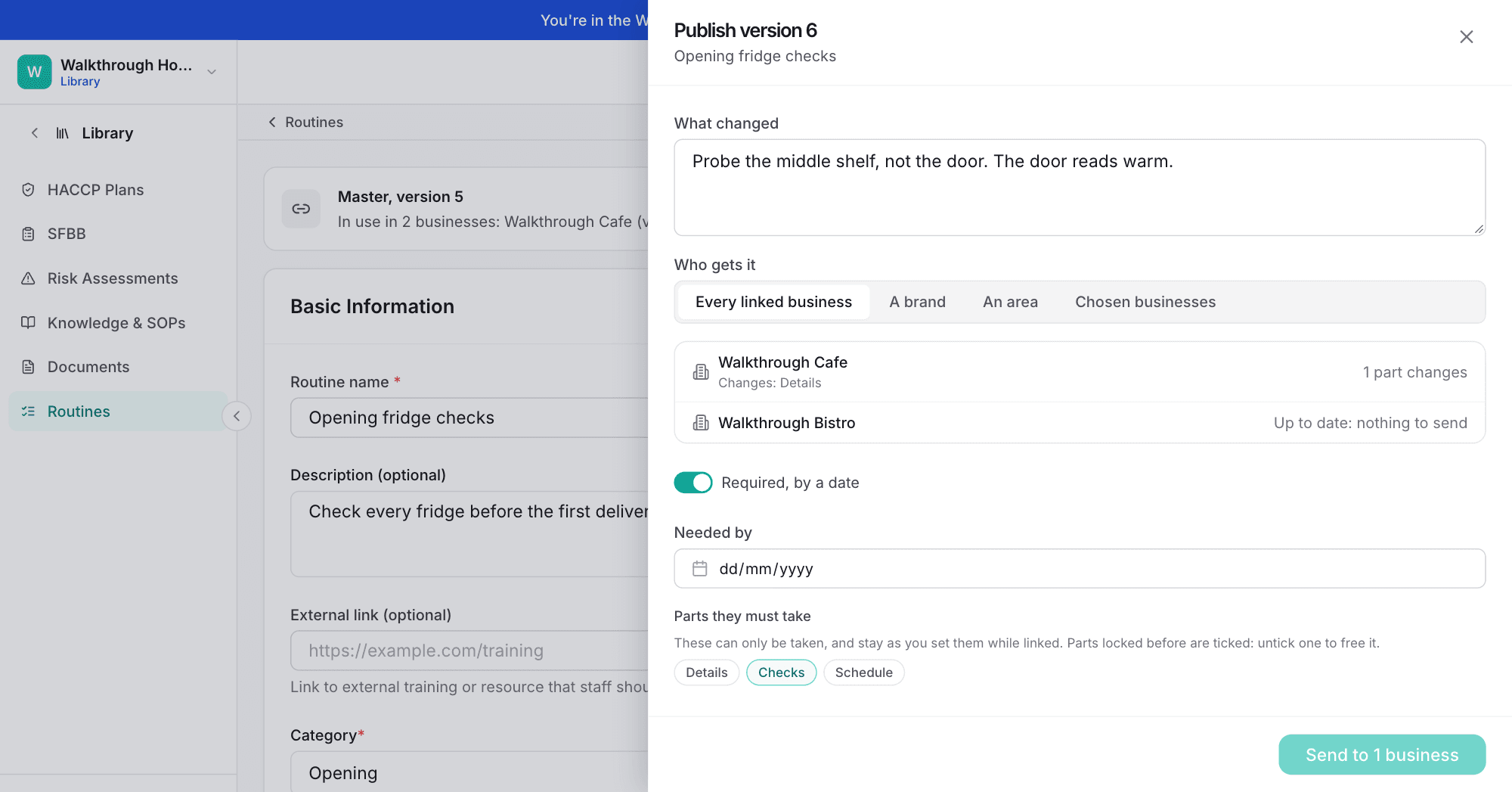
Change a master and publish it with a note. Each business reviews the change section by section and takes or keeps each part. Required updates carry a due date and can lock the parts that must not change.
Open the next site from the library
A business that joins, or one you add, is offered every master it does not have yet, ticked, and gets them in one go as drafts for its own approver.
See the whole group
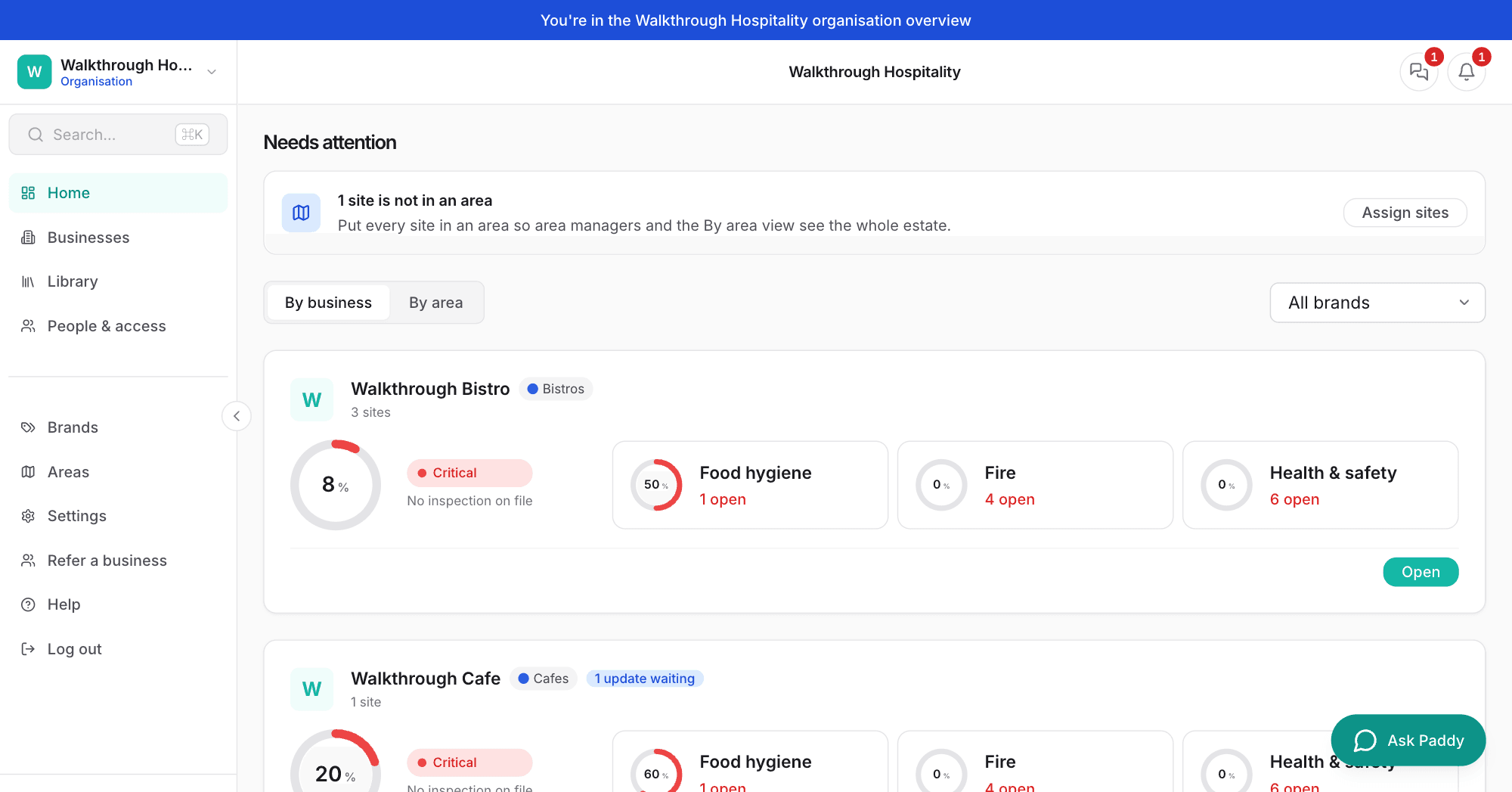
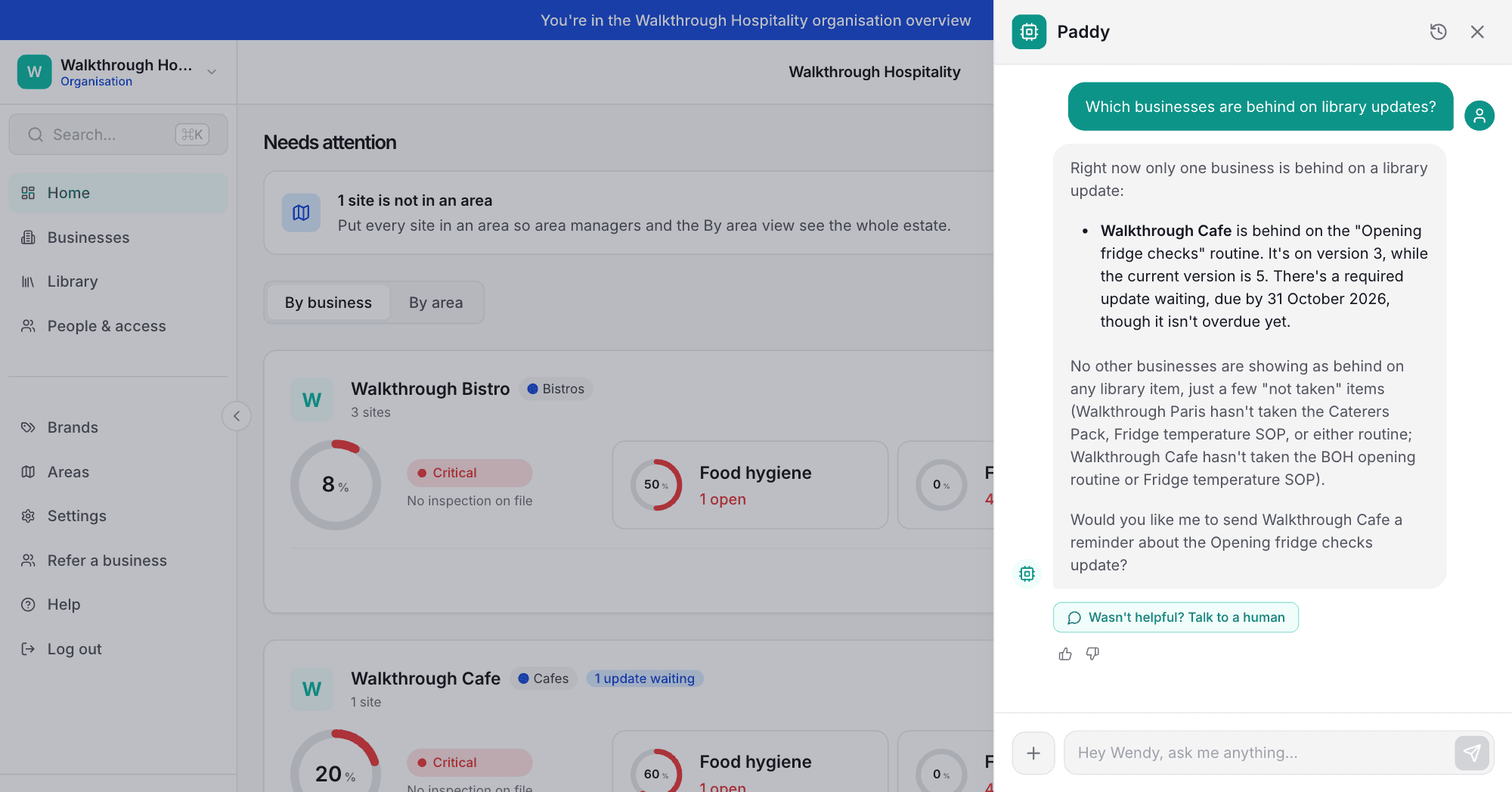
The organisation home shows each business's readiness, by business or by area, with updates waiting or overdue. Ask Paddy who is behind and remind them from a card.
Publish once, see who has it
An update with a change note, Required by a date with the brand standards locked. Then ask Paddy who is behind.
Head office standards, each business still its own
Library of masters
HACCP plans, SFBB packs (UK), risk assessments, SOPs and policies, documents and routines, held once for the whole group and rolled out to each business.
Versioned updates
Each business sees what changed next to what it has, part by part. A business that edited a part itself sees that before it takes the new version.
Required updates and locks
Set a due date and lock the parts that are brand standards. Locked parts are read-only in the business while it stays linked. Reminders go three days before the date.
Brands and areas
Group businesses into brands by what they sell, and sites into areas by where they are, even when an area spans three different businesses. A brand can set its logo and how each of its businesses' allergen page looks.
Head office messages and broadcasts
Talk to each business in its own Head office channel, and broadcast to all of them, a brand or an area. Each business sees who has read it; head office sees the report across businesses.
Organisation roles
Admins, library editors, brand managers and area managers sit on top of each business's own owner, manager and staff roles. A role never opens a business on its own.
An audit trail per business
Every decision is recorded: who took or kept which version, and when. The item history and the audit pack say which version came from the organisation.
Copy to another business
No organisation needed. The other business gets an independent draft, and nothing follows it: later changes are not passed on and nobody tracks which version it has.
The organisation library
Free for anyone with two or more businesses. Each business gets a draft linked to the master, every later change reaches it as an update it reviews, and Required updates can lock brand standards.
What Paddl's multi-business compliance software does
- A library of master HACCP plans, SFBB packs, risk assessments, SOPs and policies, documents and routines
- Add to businesses: each gets a draft for its own approver, linked to the master, with routines, equipment and documents matched in each business
- Updates reviewed section by section, side by side with what the business has, and taken or kept part by part
- Required updates with a due date and locked sections, reminders three days before and overdue after
- Brands to group businesses by what they sell, areas to group sites across businesses by where they are
- Organisation roles: admin, library editor, brand manager and area manager, on top of each business's own roles
- One organisation home with readiness by business or by area, and updates waiting or overdue
- Franchisees join by invitation they accept; an owner can take a business out at any time and it keeps its copies
- Paddy on the organisation pages answers who has taken what, at which version, and what is overdue
What it does not do
- No organisation-wide invoice: each business keeps its own subscription at the same price per site
- The organisation sees readiness, counts and library status, never a business's staff, records or documents (manager access inside a business is given by its owner)
- Masters are offered to every business in the organisation; brand-only masters are not built yet
- No shared chat room across businesses: head office talks to each business in its own Head office channel
- Organisation pages are in Paddl on the web; the app is for the work inside each business
Questions people ask about multi-business compliance software
Does an organisation cost extra?
No. Anyone who owns two or more live businesses can create one at no charge. Each business keeps its own subscription at £69 per site per month, with no volume discount and no organisation invoice.
What can head office see inside a franchisee business?
Readiness scores, counts and where the business is with each library item and update. Never its staff, its records or its documents, unless the franchisee owner gives someone manager access inside it. A franchisee joins only by an invitation its owner accepts, and the consent screen lists exactly what the organisation will see.
Can head office change a business's HACCP plan or SOPs directly?
No. Head office publishes an update to the master, and each business reviews it part by part and takes or keeps each one. A Required update has a due date and can lock chosen parts, which the business can then only take. Nothing is applied without the business approving it.
What happens if a business leaves the organisation?
Its linked items become its own independent copies, with their history kept. Nothing is deleted, and the organisation stops seeing the business.
Can we start the library from what our businesses already have?
Yes. Add to organisation library on any HACCP plan, risk assessment, SOP, document, routine or SFBB pack copies it in as a master and links that business. Paddl offers to link the same-named items in your other businesses too, keeping each one's content, so the first update shows each business what differs.
How is this different from copying between businesses?
Copy to another business makes an independent draft, and nothing follows it. A library item stays linked: every later change reaches each business as an update it reviews, and the organisation sees who has taken which version.
How Paddl compares
Where Paddl's multi-business compliance software sits against the alternatives, with prices and the honest trade-offs.
Works with
Running more than one business?
See an organisation with your own estate in mind, or start a 30-day trial and add your businesses. Franchises, multi-brand groups, hotel groups and contract caterers each have their own page.