Delivery Record Template
A goods-in record for checking food deliveries: supplier, delivery note number, product, quantity, batch code, use-by or best-before, temperature, packaging, accepted or rejected, corrective action and who checked it.
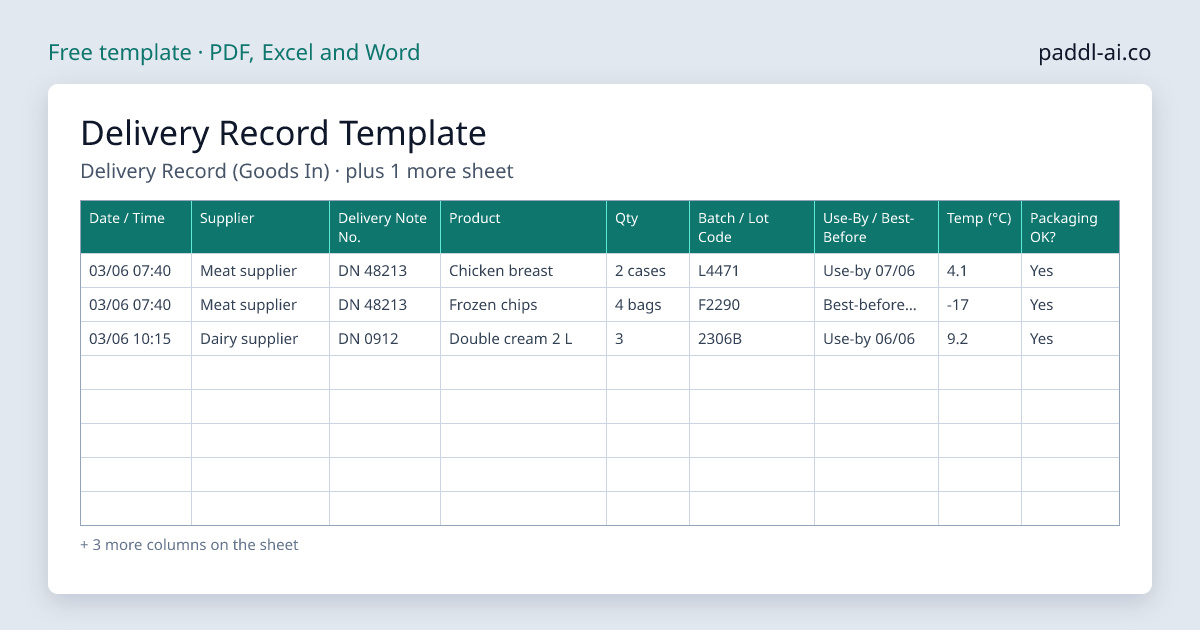
The Delivery Record Template is a free download for UK food businesses, a PDF to print or an Excel or Word file to edit, with 2 record sheets: goods-in record with a line per product, date, time, supplier and delivery note number columns, batch or lot code and use-by or best-before columns. Download it, print it or fill it in, and keep it with your food safety records; Paddl keeps the same records on a phone with timestamps and reminders.
Every delivery is the point where the supplier's food becomes your responsibility. This free record sheet gives you one line per product: when it arrived, who sent it, the delivery note number, the batch code and date mark, the temperature, and whether you accepted or rejected it. Fill it in at the door while the driver is still there. If a product is ever recalled, this sheet tells you whether you had it and where it came from.
The 2 sheets in this template
Every sheet below is in the download. Choose a PDF to print, or an Excel or Word file to add your own fridges, dishes or staff before you print.
1. Delivery Record (Goods In)
One line per product. Reject chilled food above 8°C and frozen food warmer than -15°C, and record why.
| Date / Time | Supplier | Delivery Note No. | Product | Qty | Batch / Lot Code | Use-By / Best-Before | Temp (°C) | Packaging OK? | Accepted / Rejected | Corrective Action | Checked By |
|---|---|---|---|---|---|---|---|---|---|---|---|
| 03/06 07:40 | Meat supplier | DN 48213 | Chicken breast | 2 cases | L4471 | Use-by 07/06 | 4.1 | Yes | Accepted | None needed | JM |
| 03/06 07:40 | Meat supplier | DN 48213 | Frozen chips | 4 bags | F2290 | Best-before 11/27 | -17 | Yes | Accepted | None needed | JM |
| 03/06 10:15 | Dairy supplier | DN 0912 | Double cream 2 L | 3 | 2306B | Use-by 06/06 | 9.2 | Yes | Rejected | Returned with driver, supplier called | JM |
Worked examples, then 18 blank rows to fill in on the download.
2. Delivery Temperature Limits
Keep this page with the record sheet. Your supplier's specification may set tighter limits for some products.
| Product type | Accept | Reject |
|---|---|---|
| Chilled | 8°C or below (aim for 5°C or below) | Above 8°C |
| Frozen | -15°C or colder at delivery; store at -18°C or colder | Warmer than -15°C, or soft, thawed or refrozen packs |
| Hot food | 63°C or above | Below 63°C |
| Ambient | Packs whole, dry and in date | Damaged, damp, blown or past its date |
Paddl does this automatically
Instead of filling in paper templates, Paddl generates delivery records automatically with AI - complete with digital signatures, mobile access, automatic reminders, and audit-ready records for EHO inspections.
Why you need this
What's included
How to use this template
Keep it at the door
Put the sheet and a clean, calibrated probe where deliveries come in, so the check happens before anything is put away.
Probe chilled and frozen first
Record a reading for chilled and frozen products. Reject chilled food above 8°C and frozen food warmer than -15°C.
Check the note, packs and dates
Match each product and quantity to the delivery note, look for damaged or leaking packs, and write down the batch code and the use-by or best-before date.
Record what you rejected and why
Mark each line accepted or rejected, write the corrective action (returned with the driver, supplier called), and initial the line.
Keep the sheet with the delivery notes
File the sheet with the supplier's paperwork. Together they are your one-step-back record if a recall comes in.
Tips for getting the most from this template
Download Delivery Record Template
Choose a PDF to print, or an Excel or Word file to edit. Enter your email and it downloads straight away.
Free download. No spam. Unsubscribe anytime.
Deliveries checked in on the app
- Paddy turns the delivery note into the delivery to check
- Each line marked received, short or rejected
- A warm delivery needs a corrective action before it saves
- Works offline and saves when the signal comes back
Paddy reads the supplier's delivery note, order confirmation or invoice and sets up the delivery with each product, code, pack size and quantity. Staff check it in on the app: a chilled and a frozen reading, each line received, short or rejected, and a corrective action before a too-warm delivery can save. With batch traceability on, each product gets its batch code and use-by, filled in from the note or a photo of the label. A delivery with no paperwork is logged on the same screen.
Start free with code TOOLSANDTEMPLATESCard required. Nothing to pay for your first two months. Cancel anytime.
Skip the paperwork entirely
Paddl digitises everything in this template - and more. AI-generated plans, mobile completion, automatic alerts, and audit-ready records. No printing, no filing, no gaps.