Group allergen management software for UK hospitality groups
Change a recipe once. Know every venue has it.
When a restaurant group changes a recipe or a supplier, Paddl's group allergen management makes the change once at head office and every venue's linked dishes follow: an allergen gained shows at once on each venue's chart, menus, public allergen page and QR codes, an allergen removed stays showing until someone at each venue confirms it, and each venue acknowledges the update, so head office sees which sites have it and each venue's audit pack shows who was told and when.

Allergens break between head office and the pass
Each venue is responsible for the allergen information it gives a guest, even when the recipe came from head office.
One supplier change, twenty copies to fix
A bun now contains sesame. Head office emails every site, and each kitchen updates its own matrix, menus and labels by hand, if the email is read.
No proof the site was told
When a customer reacts at one venue, the first question is whether that venue knew. A sent email does not answer it.
The QR code says one thing, the chart another
The website, the printed chart and the table QR code are three copies, updated at three different times by three different people.
Stricter moves at once, looser waits
Head office keeps master dishes, prep items, the products in them and menus in the organisation library. Each venue holds a linked copy, and every change follows these rules.
Gains go live everywhere at once
An allergen head office adds shows straight away at every linked venue: the chart, menus, public allergen page, QR codes, website embed and exports. A dish showing an extra allergen is never the unsafe mistake.
Removals wait for each venue
An allergen head office removes keeps showing at each venue until an owner or a manager for the whole business there confirms it. One confirm covers the product and every dish that loses the allergen because of it.
A new dish arrives unconfirmed
The first time a venue takes a group dish it stays off that venue's public page, exports, audit pack and labels until someone there checks its allergens. Later updates go live with head office's confirmation.
Every business acknowledges
Each venue reviews what changed, reprints what is on paper, can brief its team in one message, and acknowledges within 7 days. Reminders go before the date; after it, head office sees the update as overdue.
Head office sees who has it
Each master's History, products included, lists every version with its change note and who published it, and for every business whether it applied and when it was acknowledged. Ask Paddy which venues are behind and remind them from a card.
The trail lands in each venue's audit pack
The venue's allergen change log and audit pack show the change as Head office with the name of who published it, and who at the venue acknowledged it or confirmed a removal, and which group version the venue showed on each date. It never looks like the venue's own edit.
One view of the group's food
The group food view shows where any product or dish is used, and for each business what is waiting and for how long: dishes to confirm, held removals, unacknowledged updates, local variants, unlinked look-alikes and till gaps. A business behind on acknowledging gets a Remind button.
A procedure export for your Primary Authority
Download the group allergen procedure as a PDF or CSV: masters and their versions, when each business applied and acknowledged them, held removals and time to confirm, substitutions and allergen training coverage.
Head office sees the estate, each venue keeps its chart
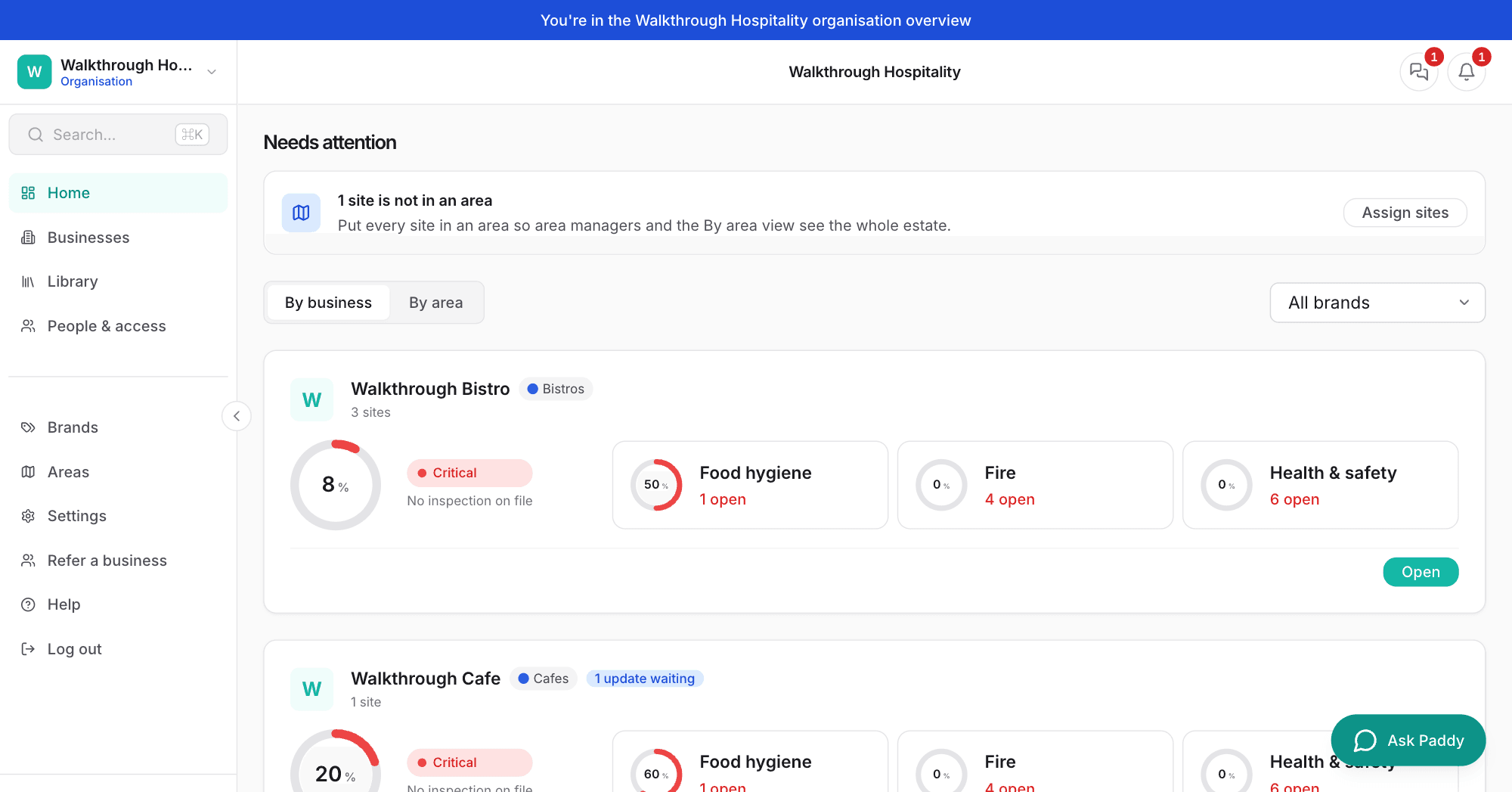
The organisation home flags a business with an update waiting. Inside the venue, the allergen chart and its change log carry the change.

One recipe for the group, a kitchen that is still its own
Locked parts
Ingredients, allergens, label and name, shelf life and method start locked at every venue, so the brand standard holds. Head office can unlock a part, such as a method that is only guidance.
Allergens are add-only
A venue can add an allergen for its own kitchen, such as may contain sesame from a shared fryer, and no group update takes it off. It can never remove one the group set.
Local variants with a reason
When the group's supplier does not deliver to a venue, it swaps the ingredient as a local variant and says why. Head office sees the variant; allergens follow the swap, and a removal still waits to be confirmed.
Link what venues already have
The link review matches each venue's existing products to the group's by supplier code, then exact name. Nothing is fuzzy and nothing links itself: a person sees the allergen differences and picks link or skip. Group allergens the venue lacks are added; its own extras stay as stricter locally.
Substitutes at the door
Delivery notes match the venue's linked group products first. When a delivery brings something else, the venue gets "Substitute for group product" and chooses: same allergens, add the substitute's allergens locally, or declare a local variant.
Specs and suppliers
The supplier spec is kept on the group product as a document, and each venue sees "Spec from head office" with its date. Supplier approval stays with each venue, so a supplier added from head office arrives unapproved.
See the impact before you publish
The publish panel says what will change, such as "Adds sesame to 6 dishes in 7 businesses". An update that changes more than 20 dishes needs a typed confirm, so a slip does not reach the whole estate.
The reprint list
One notice per update, not one per dish, listing what Paddl cannot change for you: the printed matrix, menus and posters (with the new PDF) and labels printed from Paddl that are still in date.
Live allergen page, QR codes and embed
Each venue's public allergen page, its QR codes and the website embed read live data, so a guest scanning a table code sees the change as soon as it applies. Printed codes keep working.
Group menus
Head office keeps a menu in the library, locks its name and sections, and gives it to everyone, a brand or an area. Each venue keeps its own sites, served times, page and QR code, adds local specials while the dish list is open, and marks a dish it does not serve as Not served here.
Dishes taken off, dishes to confirm
A dish head office takes off a menu leaves it at once, because no allergen changes, and stays on the venue's chart. A dish new to the venue stays off the page until someone there confirms it; the menu and the venue's Allergens home list what is waiting.
The brand's look
A brand can set the logo, colours, heading and introduction of the allergen page for every business in it, group menu pages included.
Central kitchen transfers
A site that makes food for others sends transfers with batches and use-by dates. The receiving venue holds each item linked to the source, so allergens follow it, and Paddl works out each line's label route: PPDS, full prepacked labelling, or allergen information sent with it to another business.
PPDS labels from the recipe
The label's ingredients list, in weight order with every allergen in bold, is built from the recipe, so a group change reaches the next label. The Excel export is in the layout Labl.it imports.
What Paddl's group allergen management software does
- Master dishes, prep items and the bought-in products in them, held once in the organisation library; each venue holds a linked copy
- An allergen head office adds shows at once at every linked venue: allergen chart, menus, public allergen page, QR codes, website embed and exports
- An allergen head office removes keeps showing at each venue until an owner or whole-business manager there confirms it; one confirm covers the item and every dish that loses it
- A dish a venue takes for the first time arrives unconfirmed and stays off its public page, exports, audit pack and labels until someone there checks it
- Each venue acknowledges every update within 7 days, with reminders; the master's History shows head office which venues have applied and acknowledged each version
- Ingredients, allergens (add-only), label, shelf life and method locked at the venue; a venue can add an allergen for its own kitchen but never remove the group's
- Local variants: a venue whose supplier differs swaps the ingredient with a reason head office can see
- A Products tab in the library: each group product keeps its allergens, its ingredients list and the supplier spec as a document, and each venue sees "Spec from head office" with its date
- A link review for the products venues already have: matched by supplier code, then exact name, never fuzzy or automatic, with the allergen differences shown so a person picks link or skip
- Delivery notes match a venue's linked group products first, and a delivery bringing a substitute raises "Substitute for group product" for the venue to settle
- Supplier approval stays with each venue: a supplier added from head office arrives unapproved
- An impact preview before publishing ("Adds sesame to 6 dishes in 7 businesses"), and a typed confirm when one publish changes more than 20 dishes
- One notice per update listing what to reprint: the allergen matrix, menus, posters and in-date labels
- A brand can set how the public allergen page looks for every business in it
- Each change appears in the venue's allergen change log and audit pack as Head office, with who published it, who acknowledged it and who confirmed a removal
- The venue's audit pack says which group version it showed on each date, such as "Group standard v4 applied 3 Mar, acknowledged 4 Mar"
- A group food view on the organisation home: where any product or dish is used across brands, and per business the dishes waiting to be confirmed, held removals and unacknowledged updates with their age, local variants, stricter-locally allergens, unlinked look-alikes, till gaps and the menu version on its public page
- Per business, the share of staff with current allergen training, whether written allergen information covers all 14 allergens for every dish on each menu, and the Labl.it sync state, with Remind for any business that is behind
- A group allergen procedure export, PDF or CSV, for a Primary Authority or EHO: the masters and their version history, each business's apply and acknowledgement times, held removals and how long they took to confirm, substitutions and training coverage
- Group menus in the library: name and sections locked, the dish list open for local specials or locked for a fixed-menu brand, scoped to a brand so only its businesses get it
- Each business keeps its own sites, served times, page, QR code and poster for a group menu, and a dish new to it stays off the page until someone there confirms it
- A dish head office takes off a menu leaves it at once and stays on the venue's chart; a venue can mark a dish it does not serve as Not served here
- An Erudus feed for the library or a single business: synced daily, products matched by GTIN or supplier code with a person confirming each, every spec change a review card a person approves before it flows to the venues
- Central kitchen: transfers from a site that makes food for others, with batches and use-by dates; the receiving business holds the item linked to the source, so allergens follow it (gains at once, removals held), and receiving books a batch
- The label route worked out per transfer line: PPDS when made and sold on site, full prepacked labelling produced by Paddl when packed centrally and sold at another fixed site, allergen information sent with it when supplied to another business
- Ask Paddy shares a dish with the group, makes a group menu, publishes an update, shows where a dish is used, and creates, receives and lists central kitchen transfers, once you confirm
What it does not do
- Central kitchen covers transfers, batches, use-by dates and the label route, not production planning, stock or internal ordering; for two sites of one business, confirm the label route with your Primary Authority or EHO
- Erudus is the one supplier data feed; other products' allergens come from supplier specs you upload (Paddl reads them with AI) or are entered by hand
- Billing stays per business: each venue keeps its own subscription, with no organisation invoice or volume discount
- Paddl builds the PPDS label wording from the recipe but is not a label printer: the Excel export is in the layout Labl.it imports, and a direct Labl.it connection is coming
Questions people ask about group allergen management software
How does a restaurant group update allergens at every venue at once?
Keep the dish, its prep items and the products in it once at head office, and give each venue a linked copy. In Paddl, a supplier change (say a brioche bun that now contains sesame) is made once on the master and published. The sesame shows straight away on every venue's chart, menus, public allergen page and QR codes. Each venue then acknowledges the update, and head office sees which have.
How do we prove each site was told about an allergen change?
Every venue acknowledges each update, within 7 days, with reminders before the date. The acknowledgement is recorded on the item's change log with the person and time, and head office sees applied and acknowledged for every venue in the master's History. A venue can send its team one message about the change in the same step, which stays in team chat as a record.
Why are allergen removals not applied at once?
A removal makes a dish look safer to a customer, so Paddl never applies one without a person at the venue checking it. Until an owner or a manager for the whole business confirms, the venue keeps showing the allergen. That is stricter, never unsafe, and head office can see which venues still have a removal waiting.
Can a venue change a group recipe?
Not the parts head office locks: ingredients, allergens, label, shelf life and method start locked. A venue can add an allergen for its own kitchen, such as may contain sesame from a shared fryer, and it survives every group update. If its supplier differs, it declares a local variant with a reason head office sees.
Does the QR code allergen menu update when head office changes a recipe?
Yes. Each venue's public allergen page, its QR codes and the website embed are built from live data, so they are right as soon as the update applies. Paper is not, so the update lists what to reprint: the matrix, menus, posters and labels still in date.
Does this work if our sites are one business rather than separate companies?
Yes, without an organisation. Within one Paddl business, products roll up into dishes: an allergen a product gains reaches every dish at every site at once, and a removal waits for someone to confirm it. Each site's allergen menu draws on the same dishes. The organisation layer is for groups whose brands or franchisees are separate businesses.
Does it work with a central kitchen?
Yes, with the Central kitchen module. Mark the site that makes food for others, inside one business or across an organisation, and send transfers with batches and use-by dates. The receiving business holds each item linked to the source, so its allergens follow the source: a gain at once, a removal held until someone there confirms it. Receiving books a batch for traceability, and transfers in and out appear in each audit pack. Paddl works out the label route for each line; where both sites belong to one business, confirm that route with your Primary Authority or EHO.
What can we show our Primary Authority?
The group allergen procedure export, a PDF or CSV that organisation admins download. It covers the group's masters and their version history, when each business applied and acknowledged each version, held removals and how long they took to confirm, substitutions, and allergen training coverage per business. At a single venue, the audit pack shows the same trail for that venue, including which group version it showed on each date.
Our venues already have the same products. Do we start again?
No. Add the product to the library from any business, then run the link review. For each venue Paddl lists its products that match by supplier code, then by exact name, never a fuzzy guess and never linked automatically. A person sees the allergen differences and picks link or skip for each pair. On link, any group allergen the venue lacks is added at once, and any allergen the venue has that the master does not stays as stricter locally. Linking never changes the venue's own confirmations.
What happens when a delivery brings a substitute for a group product?
The venue gets a review headed "Substitute for group product" and the product name, with three choices: it has the same allergens (no change), add the substitute's allergens to the group product at this venue (stricter, kept locally), or declare a local variant with a reason head office can see. Delivery notes otherwise match the venue's linked group products before creating anything new, so duplicates do not pile up.
Can head office share a whole menu with each venue?
Yes. A group menu is kept in the organisation library with its name, note, sections and dishes, and can be for everyone, chosen brands or chosen areas, so the Burger Shop menu reaches only Burger Shop businesses, including one that joins the brand later. Each venue picks the sites that serve it, sets its served times and publishes its own page and QR code. The dish list starts open so a venue can add local specials, and head office can lock it for a brand with a fixed menu. A dish new to a venue stays off its page until someone there confirms it, and the menu and the venue's Allergens home show what is waiting.
What does group allergen management cost?
An organisation is free for anyone who owns two or more businesses. Each business keeps its own subscription at £69 per site per month, with every feature included, no organisation invoice and no volume discount.
How Paddl compares
Where Paddl's group allergen management software sits against the alternatives, with prices and the honest trade-offs.
Works with
Running allergens for more than one venue?
See group allergens with your own estate in mind, or start a 30-day trial. How the allergen matrix works at a single venue, and how organisations link separate businesses, each have their own page.